

Noter AI on iPhone and iPad
Noter AI is an AI note taker app for iPhone and iPad. It records a meeting, or sends a bot to your video call, and gives you a transcript, a summary and action items. On iPhone you can start a recording from Control Center, Siri or the Action button, and the iPad has its own layout for the larger screen.
Updated October 2026
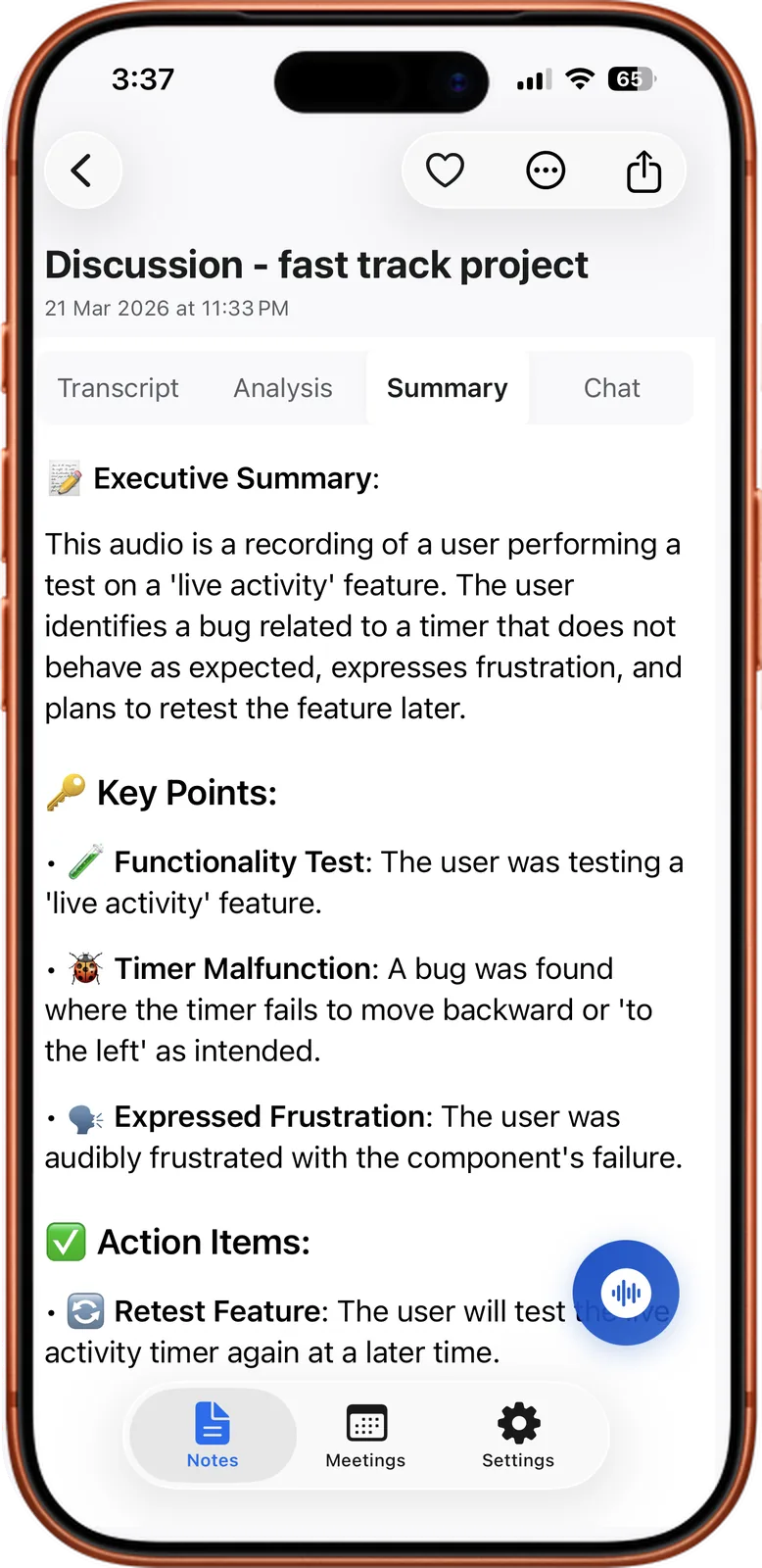
A finished note on iPhone
How it works
- 1Install the app. Get Noter AI from the App Store. The same app runs on iPhone and iPad.
- 2Sign in. Sign in with Apple is supported.
- 3Capture a meeting. Record in the room with one tap, or paste a Zoom, Microsoft Teams, Google Meet or Webex link to send the bot.
- 4Wait about 2 minutes for a 1-hour recording. On iPhone, the Dynamic Island and the Live Activity show the progress.
- 5Open the note. Read the summary, check the transcript, or ask a question about it.
Noter AI records, transcribes and summarizes your meetings on iPhone, iPad & Android, in 60+ languages.
What you get
- Recording that survives a locked screen. It keeps running in the background, for up to three hours per recording.
- A bot for video calls. It joins as a visible guest. Nothing is installed inside the meeting app.
- Transcripts in 60+ languages. The language is detected automatically. Each line has a speaker label and a timestamp.
- Summary, detailed analysis and action items. They are written automatically for every note.
- Ask your notes. Ask a question about one note, several notes or all of them. The answer comes with the source note attached.
- Calendar. Connect Google Calendar or Outlook and send the bot to an upcoming meeting in one tap.
- Export. Save a note as PDF, Word or plain text, or pass it to another app with the share sheet.
The iPhone extras
These are the parts that use what the iPhone itself offers. Most of them exist for one reason: to start a recording before the meeting has moved on.
| Extra | What it does | When it helps |
|---|---|---|
| Control Center button | Starts a recording from Control Center | You are in another app and a meeting starts |
| Siri shortcut | Starts a recording when you say: start recording in Noter AI | Your hands are busy, or you are walking into the room |
| Action button | Starts a recording with a press of the Action button, on iPhone models that have one | You want to start without looking at the screen |
| Home-screen widget | Puts Noter AI on your home screen | You want the app in reach without searching for it |
| Dynamic Island and Live Activity | Show processing status and bot status | You want to know when the note is ready, or whether the bot is in the call |
| Share extension | Imports audio from another app through the share sheet | You have a voice memo or an audio file to transcribe |
- Pick one way to start and keep to it. If you use the Action button every time, you stop missing the first minutes of a meeting.
- The share extension takes audio only. Video files and PDFs are not imported.
The iPad layout
On iPad, Noter AI uses a layout made for the larger screen. You install it from the same App Store page as the iPhone app.
The iPad suits the reading part of the work. A long transcript or a formal report is easier to go through on a large screen, and it is a comfortable place to edit a summary before you send it.
The iPad can also be the device on the table. Tap record, lock the screen, and the recording keeps running.
Sample output
This is an invented example. It shows a note in the key bullet points style, for a 25-minute Q4 launch check-in recorded on an iPhone.
- Launch date: stays on 18 November. Nobody asked to move it.
- Website: the new landing page is ready. Sara is waiting for two customer quotes.
- Budget: Omar reported that ad spend is 10% under plan. The team agreed to keep the difference for launch week.
- Risk: the payment provider has not confirmed the new price. This could delay the launch by a few days.
- Action item, Sara: collect the two customer quotes by Friday.
- Action item, Omar: call the payment provider tomorrow and report back in the team chat.
Limits and honest notes
- No Mac or Windows app, and no web app. Noter AI runs on iPhone, iPad and Android only.
- No phone call recording. iOS gives apps no access to call audio. Put the call on speaker and record the room.
- The Action button needs the right iPhone. Older models do not have one. Control Center and Siri work as the other quick starts.
- The bot can be blocked by the host. A waiting room, a rule that only signed-in users can join, or disabled guest access can stop it. If it waits in the lobby, the host admits it like any other guest.
- Billing goes through Apple. You subscribe and cancel in your App Store subscription settings, and refunds are handled by Apple.
On Android too
Android has the app as well. Get either version from the download page.
Privacy on your Apple devices
Notes and audio are encrypted in transit and at rest. They are stored on Google Cloud and are not used to train AI models.
You can delete a single note or your whole account at any time. Where are my meeting recordings stored explains this in more detail.
Frequently asked questions
Is there one app for iPhone and iPad, or two?
One. You install Noter AI from the App Store, and the iPad gets a layout made for its larger screen.
How do I start a recording fast on iPhone?
There are three quick ways: the Control Center button, the Siri shortcut (say: start recording in Noter AI), and the Action button on iPhone models that have one.
What does the Dynamic Island show?
It shows the status of a note that is being processed, and the status of the bot when you have sent it to a video call. The same information appears as a Live Activity.
Can I use Noter AI on my Mac?
No. There is no Mac app, no Windows app and no web app. Noter AI is for iPhone, iPad and Android.
Can I transcribe a Voice Memo on my iPhone?
Yes. Share the memo to Noter AI from the Voice Memos app. The share extension brings the audio in and the note is made the usual way. See how to transcribe a voice memo on iPhone.
How much does it cost on iPhone and iPad?
There is a free plan to try the app, and a free trial on every subscription. The paid plan is $11.99 per month, $89.99 per year or $5.99 per week in the US. Prices in other countries vary. See pricing.
How good is the App Store rating?
Noter AI is rated 4.8 out of 5 on the App Store and has more than 100K users.
Let Noter AI take your meeting notes
Record, transcribe, and summarize meetings on iPhone, iPad & Android, or send a bot to Zoom, Teams, Meet, or Webex. In 60+ languages.

On your computer? Scan with your phone to get the app.
