

Ask your notes: chat with one meeting or all of them
Ask your notes is the AI chat inside Noter AI. You type a question about one meeting, a few meetings, or every meeting you have recorded, and you get an answer with the source note attached. It saves you from reading old notes one by one to find a single decision.
Updated October 2026
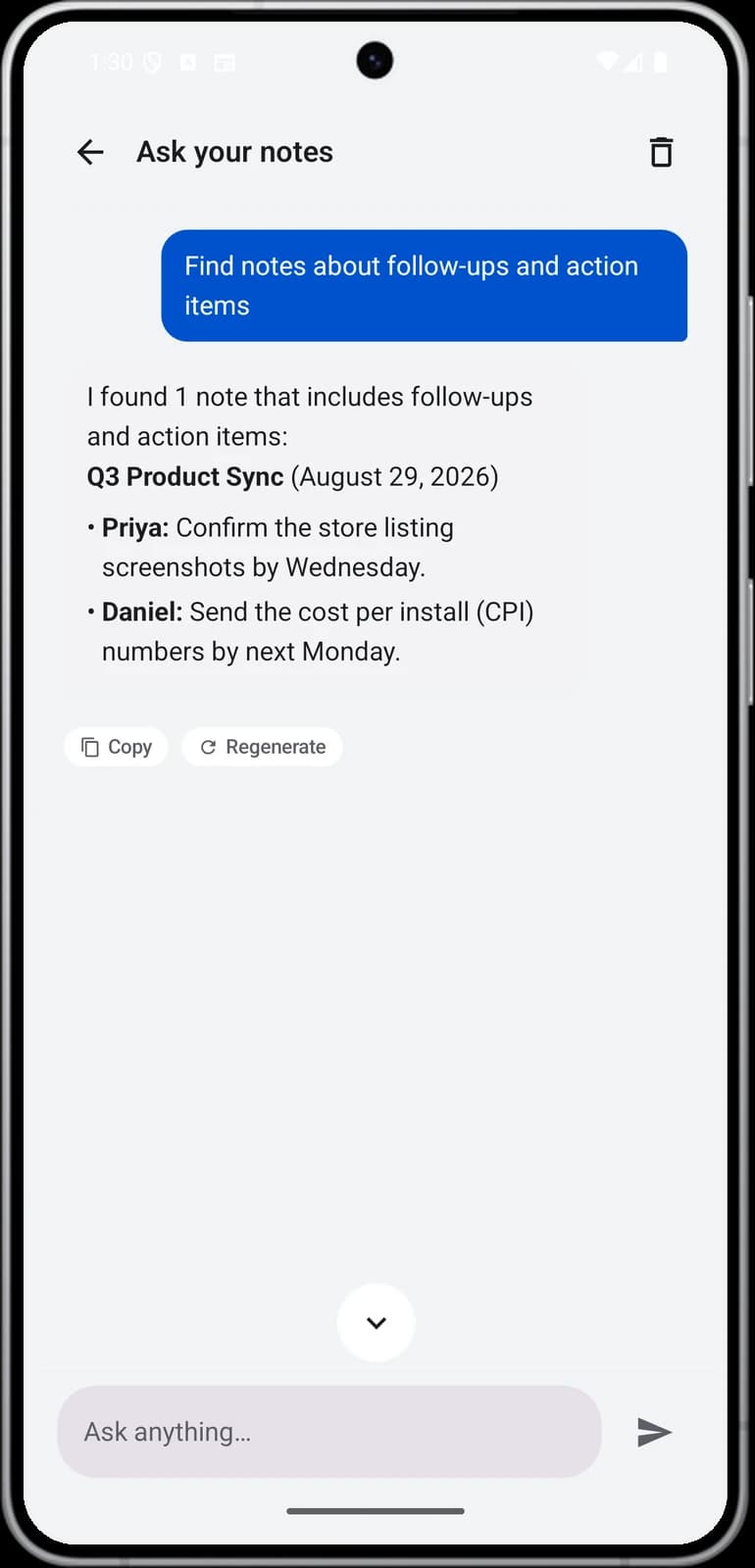
Ask across all your notes
How it works
- 1Record your meetings as usual. Each one becomes a note with a transcript, a summary and action items.
- 2Choose the scope. Ask about one note, several notes, or all notes at once.
- 3Type your question in plain words. For example: "What did we decide about the launch date?"
- 4Read the answer and open the source. The answer comes with the source note attached, so you can check where it came from.
Noter AI records, transcribes and summarizes your meetings on iPhone, iPad & Android, in 60+ languages.
What you get
| Capability | Detail |
|---|---|
| Chat with one note | Ask about a single meeting |
| Chat with several notes | Pick the notes that belong together, for example all meetings with one client |
| Chat with all notes | Ask one question across everything you have recorded |
| Source attached | Each answer comes with the note it was taken from |
| Folders | Group notes by client, project or class |
| Search | Search across note titles and AI notes |
| Price | Included in the one plan. No AI credits |
Sample output
This is an invented example. The question is asked across all notes.
Question: "What is the new Q4 launch date, and who is responsible for the pricing page?"
Answer: "The launch moved from 3 November to 10 November. Lina is responsible for the pricing page and said she would finish the copy by Friday."
Source: the note "Q4 launch planning".
A follow-up question in the same chat:
Question: "Did anyone raise a risk about that date?"
Answer: "Yes. Omar said the payment provider review can take five working days, so it has to be submitted the next day to keep 10 November."
Source: the note "Q4 launch planning".
Example questions: one note versus all notes
The scope changes what kind of question makes sense. One note is best for detail. All notes is best for finding something when you do not remember which meeting it was in.
| Ask one note | Ask across all notes |
|---|---|
| What did Omar say about the payment review? | Which meetings mentioned the payment provider? |
| List every date that was mentioned. | What have I promised this month that is still open? |
| What questions were left unanswered? | When did we first talk about moving the launch? |
| Why did we choose the tenth of November? | What has this client asked for in our last few calls? |
| Write a short update from this meeting for my manager. | What did the team decide about pricing this quarter? |
| What did I agree to do? | Who was the contact for the security review? |
- Several notes sits in between. Pick the four meetings of one project and ask how the plan changed over time.
- Name things. "What did Sara say about the budget?" works better than "What about the budget?"
- Students use it the same way. Ask one lecture for a definition, or ask all lectures of a course what was said about a topic before an exam.
What it cannot answer
The chat works from your notes. That sets clear limits on what it can tell you.
- Things nobody said. If the budget was never discussed in a recorded meeting, there is no source for an answer.
- Meetings you did not record. A call without a recording is not in your notes.
- Documents and videos. Noter AI does not import PDFs, video files or YouTube links, so the chat cannot read slides or a contract.
- What people meant. It can tell you what was said. It cannot know what someone was thinking.
- Words the transcript got wrong. If a name or a number was misheard, the answer repeats the mistake. Open the source note and listen to that line.
Chat or search: which one to use
Noter AI has both. They solve different problems.
| You want to | Use |
|---|---|
| Open a note you can roughly name | Search across note titles and AI notes |
| Keep one client's or one project's notes together | Folders |
| Get an answer in a sentence | Chat |
| Compare what was said in different meetings | Chat across several notes or all notes |
Limits and honest notes
- Check the source before you act. The answer is a starting point. The attached note is the proof.
- It is as good as your notes. Clear recordings and renamed speakers give better answers.
- Vague questions get vague answers. Add a name, a project or a time period.
- Phone and tablet only. Noter AI runs on iPhone, iPad and Android. There is no web app and no desktop app.
- Your notes stay yours. They are encrypted in transit and at rest, and they are not used to train AI models. You can delete a note or your whole account at any time.
Frequently asked questions
Can I chat with all my meeting notes at once?
Yes. You can ask a question about one note, several notes, or all notes at once. The answer comes with the source note attached.
How do I know the answer is correct?
Open the source note that comes with the answer. From there you can read the transcript and tap a line to hear the audio from that moment.
Can I ask about only some of my meetings?
Yes. You can ask across several notes that you choose. This is useful for one client or one project, when you want to leave out everything else.
What kind of questions work best?
Specific ones. Include a name, a project or a topic, such as "What did Sara say about the budget?" For one note, ask for details. Across all notes, ask where and when something was discussed.
Can it answer questions about a PDF or a video?
No. Noter AI works with audio recordings and audio files. It does not import PDFs, video files or YouTube links, so the chat has nothing to read from them.
Is there a plain search as well as the chat?
Yes. You can search across note titles and AI notes, and you can sort notes into folders. Use search to open a note and chat to get an answer.
Is the chat an extra cost, or limited by credits?
No. It is part of the one Noter AI plan, and there are no AI credits. There is a free plan to try the app and a free trial on every subscription.
Are my notes used to train AI models?
No. Your notes are not used to train AI models. They are encrypted in transit and at rest, and you can delete them at any time.
Let Noter AI take your meeting notes
Record, transcribe, and summarize meetings on iPhone, iPad & Android, or send a bot to Zoom, Teams, Meet, or Webex. In 60+ languages.

On your computer? Scan with your phone to get the app.
