

AI meeting summaries and action items
Noter AI writes a summary, a detailed analysis and a list of action items with assignees for every meeting you record. All three are generated automatically, about 2 minutes after a one-hour meeting. You can then reshape the same recording into minutes, an email, a to-do list or a format you describe yourself.
Updated October 2026
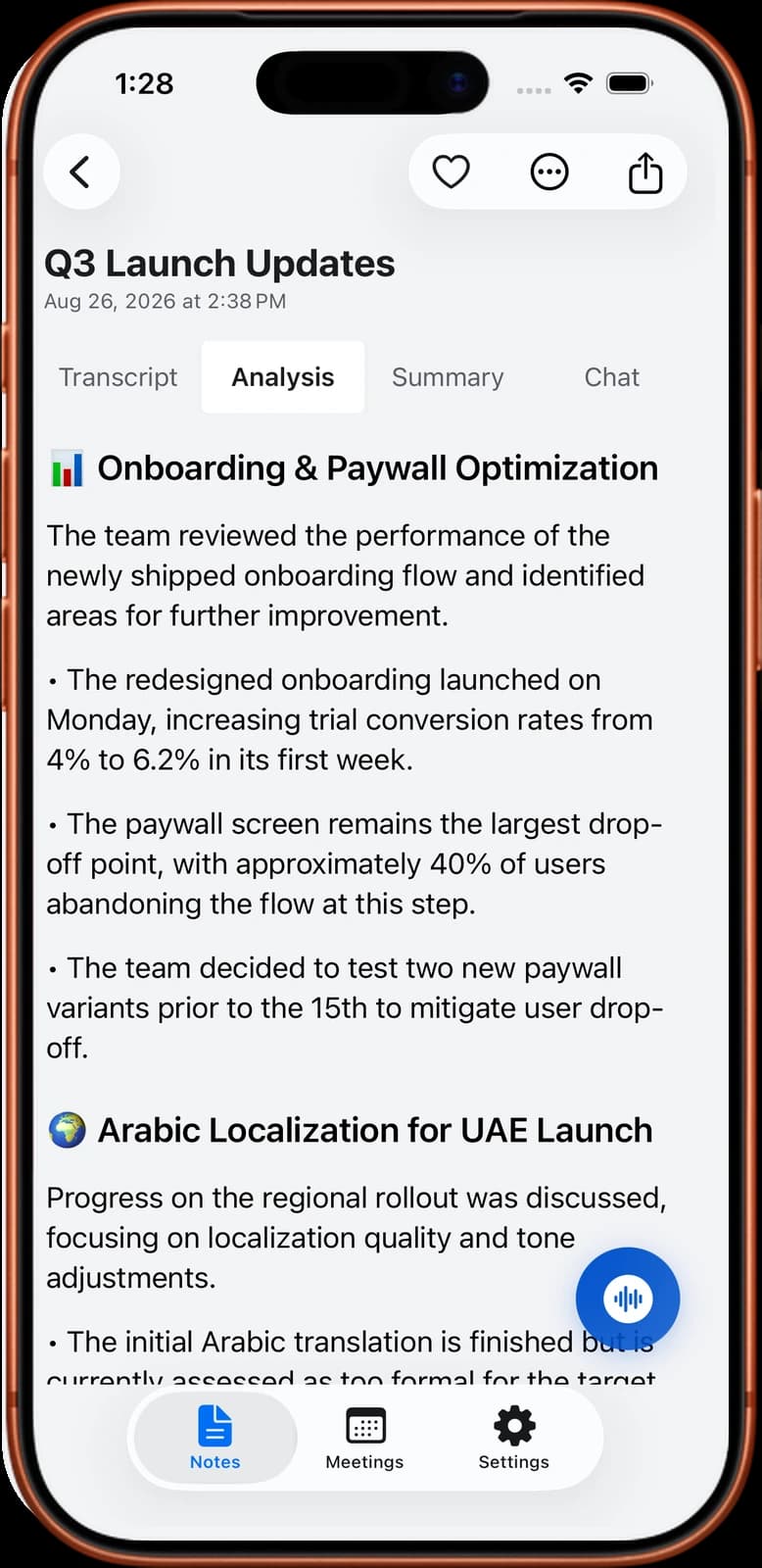
Written for you after the meeting
How it works
- 1Record the meeting. Record on your phone in the room, or send the bot to a video call.
- 2Let the app process it. A one-hour recording takes about 2 minutes.
- 3Open the note. The summary, the detailed analysis and the action items are already there. You do not ask for them.
- 4Pick another output style if you need one. Run the same recording through a different style, for example an email to send to the client.
- 5Edit and share. Fix anything that is wrong in the summary, then export it or copy it.
Noter AI records, transcribes and summarizes your meetings on iPhone, iPad & Android, in 60+ languages.
What you get
- A summary of what was discussed and decided.
- A detailed analysis for when the short version is too short.
- Action items with assignees, so each task has a name next to it.
- Six output styles, including a custom instruction in your own words.
- More than one style per recording. The meeting is recorded once and can be written up several ways.
- Your choice of language. The summary comes in the meeting's language or in a language you choose.
- No caps on summaries. The plan has no AI credits and no summary limit.
- Export as PDF, Word (.docx) or plain text, or copy with rich formatting. Details on export and sharing.
Sample output
This is an invented example for a 30-minute Q4 launch meeting with three people.
Summary: The Q4 launch moves from 3 November to 10 November. The pricing page is the main reason for the delay. The payment provider review must be submitted tomorrow to keep the new date. The team will meet again next Monday to confirm.
Decisions: New launch date is 10 November. The launch email goes out the same morning. No changes to the launch price.
Action items:
| Task | Assignee | Due |
|---|---|---|
| Submit the payment provider review | Omar | Tomorrow |
| Send the new timeline to the whole team | Sara | Wednesday |
| Finish the pricing page copy | Lina | Friday |
| Draft the launch email | Lina | Next Monday |
The six output styles and when to use each
A style changes how the note is written. The recording stays the same. You can run one meeting through several styles and keep each result.
| Style | What it produces | Use it when |
|---|---|---|
| Minutes of meeting | A formal record of the discussion, the decisions and the tasks | You need an official record for a board, a committee or a client |
| Key bullet points | The main points as a short list | You want to read the outcome in under a minute |
| A message you can send to the people who attended | You want to send a recap or a follow-up right after the call | |
| To-do list | Only the tasks | You care about what to do next and want to skip the discussion |
| Formal report | A longer structured document | You report to a manager or a client who was not in the meeting |
| Custom instruction | Whatever format you describe in your own words | You have a fixed format, for example the fields in your CRM or a weekly status template |
- A custom instruction can be one sentence. For example: "Write three sections: decisions, open questions, risks. Keep each under five lines."
- Combine styles. Use minutes for the record and the email style for the message you send.
- Need a structure to start from? See the meeting minutes template and the meeting recap email template.
Editing the summary
The summary is a draft that you own. You can edit it in the app before anyone else sees it. A two-minute read before you send it is worth the time.
- Check names. People, companies and products are where speech-to-text makes the most mistakes.
- Check numbers and dates. Prices, deadlines and quantities matter most and are easy to mishear.
- Check each assignee. Make sure every task sits with the person who agreed to it.
- Remove what should stay private. Cut side comments before you share the note.
- Go back to the source. If a sentence looks wrong, open the transcript, tap the line and listen to that moment.
- Then export. Send it as PDF or Word, or copy it with rich formatting into an email or a document.
Limits and honest notes
- It summarises what was said. A decision made later in a message or a hallway is not in the recording, so it is not in the summary.
- Weak audio gives a weak summary. If the transcript misses a sentence, the summary misses it too.
- Assignees come from the conversation. If nobody took a task out loud, check who the app assigned it to.
- Read it before you send it. Treat the summary as a first draft, most of all when it goes to a client.
- It works on audio. Noter AI does not summarise video files, YouTube links or PDFs.
- Phone and tablet only. There is no web app and no desktop app.
Frequently asked questions
Does Noter AI create action items automatically?
Yes. Every note has action items with assignees, and they are generated automatically along with the summary and the detailed analysis. You do not have to ask for them.
What are the six output styles?
Minutes of meeting, key bullet points, email, to-do list, formal report, and a custom instruction where you describe the format in your own words.
Can I get more than one version from the same meeting?
Yes. The same recording can be run through more than one style. For example, create minutes for the record and an email for the people who attended.
Can I edit the summary?
Yes. You can edit the summary in the app. It is a good habit to check names, numbers and assignees before you share it.
Can the summary be in a different language from the meeting?
Yes. The summary comes in the meeting's language, or in a language you choose. A meeting held in Arabic can have an English summary.
Is there a limit on how many summaries I can generate?
No. The plan has no caps on summaries and no AI credits. It costs $11.99 per month, $89.99 per year or $5.99 per week in the US, and local prices vary by country.
How do I send the summary to my team?
Export it as PDF, Word (.docx) or plain text, copy it with rich formatting, or use the system share sheet to send it through another app.
Let Noter AI take your meeting notes
Record, transcribe, and summarize meetings on iPhone, iPad & Android, or send a bot to Zoom, Teams, Meet, or Webex. In 60+ languages.

On your computer? Scan with your phone to get the app.
