

Meeting transcription in 60+ languages
Noter AI turns a recorded meeting into a written transcript in 60+ languages. Every line has a speaker label and a timestamp, and the app detects the language by itself. You record on your phone or send a bot to a video call, and the transcript is ready about 2 minutes later for a one-hour meeting.
Updated October 2026
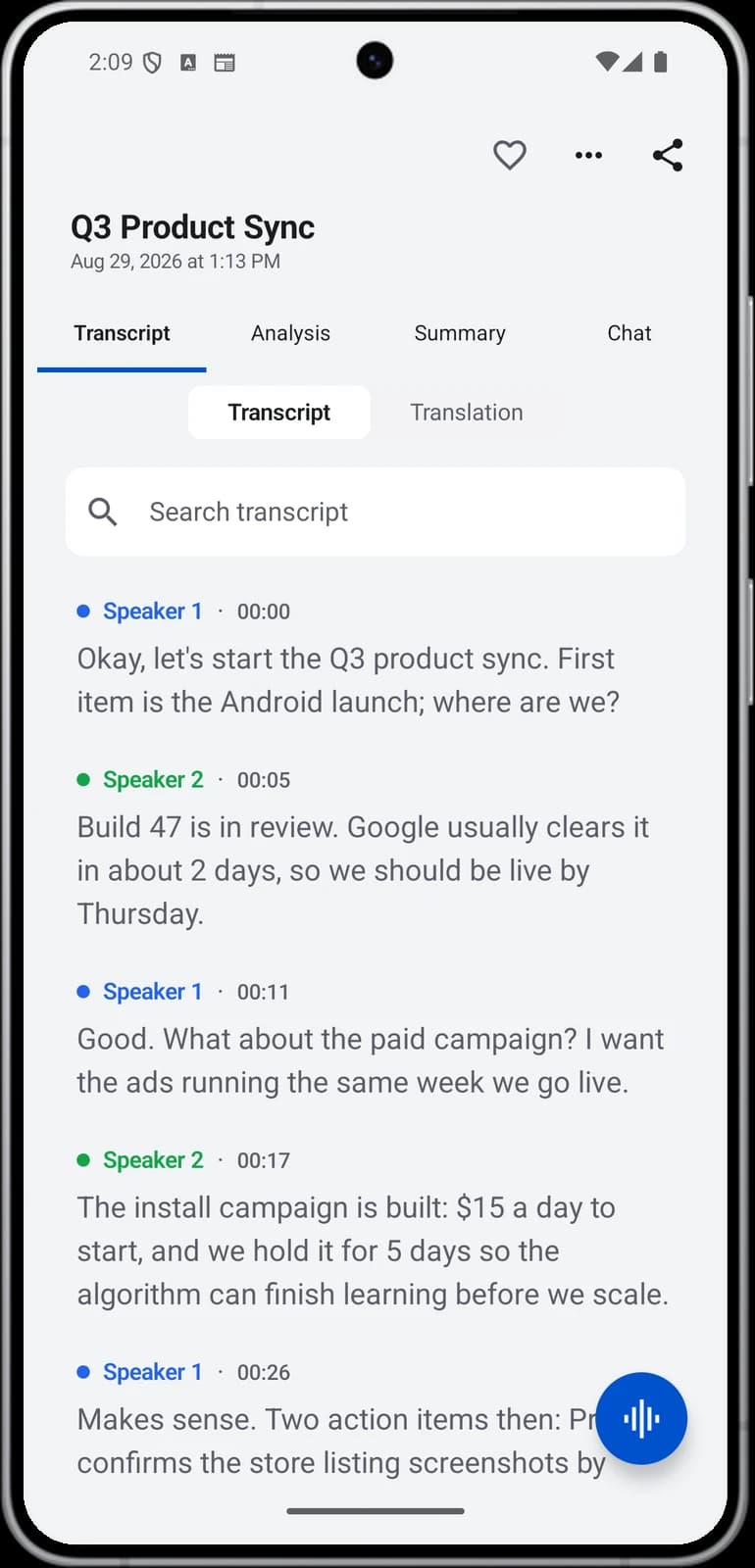
Every line, labelled
How it works
- 1Capture the audio. Record in the room with one tap, send the bot to a Zoom, Microsoft Teams, Google Meet or Webex call, or import an audio file you already have.
- 2Skip the language menu. There is no language to choose before you record. Detection is automatic.
- 3Wait a short time. Processing takes about 2 minutes for a one-hour recording.
- 4Read and check. Open the note, read the transcript, and tap any line to play the audio from that moment.
- 5Rename the speakers. Change the speaker labels to real names so the transcript reads properly.
Noter AI records, transcribes and summarizes your meetings on iPhone, iPad & Android, in 60+ languages.
What you get
| Capability | Detail |
|---|---|
| Languages | 60+, detected automatically |
| Speaker labels | Each line is tagged with a speaker. You can rename speakers |
| Timestamps | On every line |
| Audio playback | Tap a line and the audio plays from that moment |
| Mixed languages | Handles speakers who switch language, including two languages in one sentence |
| Arabic | Written in formal Modern Standard Arabic |
| Translation | The transcript translates into 46 languages and keeps speaker labels and timestamps |
| Recording length | Up to three hours per recording |
| Audio import | M4A, MP3, WAV and other audio files, or share audio in from Voice Memos, Files or WhatsApp |
| Export | PDF, Word (.docx) or plain text |
Sample output
This is an invented example. It shows a short part of a transcript from a Q4 launch meeting, after the speakers were renamed.
| Time | Speaker | Line |
|---|---|---|
| 00:12 | Sara | Let's start with the launch date. Are we still on for the third of November? |
| 00:19 | Omar | I don't think so. The pricing page is not finished and the payment review takes five working days. |
| 00:31 | Sara | So the tenth is more realistic? |
| 00:34 | Omar | Yes, the tenth works if I submit the review tomorrow. |
| 00:41 | Lina | I can finish the pricing page copy by Friday. |
| 00:47 | Sara | Good. I will send the new timeline to everyone on Wednesday. |
- Before you rename them, speakers appear with generic labels.
- The same note also holds a summary and action items. See AI meeting summaries.
Mixed-language meetings
Many meetings do not stay in one language. A team speaks Arabic and says the product names in English. A call starts in Spanish and moves to English when a new person joins. Noter AI handles these meetings because it does not lock a recording to one language.
Here is an invented line where the speaker changes language in the middle of the sentence. Both halves are written down as they were said:
"Vamos a mover la fecha al viernes, the client already agreed to that."
- Nothing to set up. You do not tell the app which languages to expect.
- Read it in one language afterwards. Translate the transcript into any of 46 languages. Speaker labels and timestamps stay in place. More on the translation page.
- Choose the summary language. The summary comes in the meeting's language or in a language you pick.
- Arabic meetings. Arabic is written in formal Modern Standard Arabic.
- Step-by-step guide: how to transcribe a bilingual meeting.
How to get a cleaner transcript
The transcript can only be as clear as the audio. These habits cost nothing and make the biggest difference.
- Put the phone in the middle. Place it on the table at a similar distance from everyone. A phone next to one person makes the others sound far away.
- Keep it out of your pocket or bag. Cloth over the microphone muffles every voice.
- One speaker at a time. When two people talk over each other, words get lost and the speaker labels become less reliable.
- Move away from noise. A fan, an open window or a coffee machine next to the phone covers quiet voices.
- Do not tap or slide the phone. Bumps on the table are loud in the recording.
- Say names out loud at the start. A quick round of introductions makes it easy to rename the speakers later.
- On a phone call, use the speaker. Put the call on speaker and keep the phone close to you.
- On a video call, use the bot. It records from inside the call, so room noise on your side matters less. See the meeting bot.
Limits and honest notes
- It is audio only. Noter AI does not import video files, YouTube links or PDFs.
- No direct phone call recording on iPhone. iOS gives apps no access to call audio. The way around it is speaker mode.
- Three hours per recording. For a longer session, stop and start a second recording.
- Mistakes happen. Names, numbers and rare terms are the usual errors. Tap the line and listen before you quote someone. Read more on how accurate AI meeting transcription is.
- Speaker labels can slip. This happens most when people interrupt each other or sound alike.
- No web or desktop app. Noter AI runs on iPhone, iPad and Android.
Frequently asked questions
How many languages does Noter AI transcribe?
More than 60. The app detects the language automatically, so there is nothing to choose before you record.
What happens when people switch languages during the meeting?
The transcript follows them. Noter AI handles meetings where speakers change language, including a sentence that contains two languages.
Does the transcript show who said what?
Yes. Each line has a speaker label and a timestamp. You can rename the speakers to their real names after the meeting.
How long does transcription take?
About 2 minutes of processing for a one-hour recording. The transcript, the summary and the action items arrive together in one note.
Can I transcribe an audio file I already have?
Yes. Import M4A, MP3, WAV and other audio files, or share audio into the app from Voice Memos, Files or a WhatsApp voice note. Video files, YouTube links and PDFs are not supported.
Can I check a line against the original audio?
Yes. Tap any line in the transcript and the audio plays from that moment. This is the fastest way to confirm a name or a number.
Can I translate the transcript?
Yes, into 46 languages. The translated transcript keeps the speaker labels and the timestamps.
How is Arabic written in the transcript?
In formal Modern Standard Arabic.
Let Noter AI take your meeting notes
Record, transcribe, and summarize meetings on iPhone, iPad & Android, or send a bot to Zoom, Teams, Meet, or Webex. In 60+ languages.

On your computer? Scan with your phone to get the app.
