

Meeting notes vs meeting minutes: what is the difference and which one do you need?
People use "notes" and "minutes" for the same thing, but they are two documents with two jobs. This article shows the difference, tells you which one your meeting needs, and shows how one recording can give you both.
Updated October 2026
Meeting notes are an informal summary for the people doing the work: what was discussed, what was decided and who does what. Meeting minutes are the formal record of a meeting, written in a fixed format by one named person and approved by the group. Use notes for everyday team meetings. Use minutes when a board, committee or other formal body has to keep a record.
What each one is, and how to write either by hand
Both documents answer one question: what happened in the meeting? They differ in who reads them and how much weight they carry.
Meeting notes are a working document. Anyone in the meeting can write them, in any layout. They go to the people who attended and to the people who missed it. Nobody approves them. Their job is to make sure everyone leaves with the same list of decisions and tasks.
Meeting minutes are a record. One named person writes them in a fixed order: the meeting details, who attended, each agenda item with its decision, the actions, and the closing time. The group then confirms that the minutes are correct, usually at its next meeting. After that, the minutes are the organisation's own account of what was decided.
You can produce either one with a pen, a document editor or a recording. These steps work with any tool.
- 1Ask who will read it. If the readers are only the team, write notes. If someone outside the meeting may rely on it later, such as members, an auditor or a new committee, write minutes.
- 2Check your own rules. Read the constitution, bylaws or terms of reference of your group before the meeting. They often say whether minutes must be kept and who keeps them.
- 3Name one writer before the meeting starts. For minutes this is usually the secretary or a person the chair appoints. For notes, any attendee can do it.
- 4Capture decisions and tasks first. Write what was agreed, who owns each task and the due date. This part is the same in notes and in minutes.
- 5For minutes, add the record fields. Date, start and end time, place, who was present and who was absent, each agenda item in agenda order, and the exact wording of anything the group voted on.
- 6For notes, cut what the team will not use. Short lines in the team's own words. One page is enough for most meetings.
- 7Send it. Notes go out the same day, as they are. Minutes go out marked as a draft, and the group approves or corrects them at its next meeting.
Noter AI records, transcribes and summarizes your meetings on iPhone, iPad & Android, in 60+ languages.
Meeting notes vs meeting minutes, side by side
The table shows the differences that matter in practice. The two documents also share a core. Both must carry the decisions, the owner of each task and the due dates. If those three are missing, neither document has done its job.
If you want a layout to copy, there is a meeting notes template with three informal formats and a meeting minutes template with the full formal structure.
| Question | Meeting notes | Meeting minutes |
|---|---|---|
| What is it? | An informal summary of the meeting | The formal record of the meeting |
| Who writes it? | Any attendee | One named person, often the secretary |
| Who reads it? | The team and anyone who missed the meeting | Members, absentees, and later auditors or new officers |
| How formal is it? | Free layout, everyday language | Fixed order, past tense, neutral wording |
| Is it approved? | No | Yes, usually at the next meeting |
| What does it leave out? | Anything the team does not need | Side talk and personal opinions |
| How long is it kept? | While the work is active | As long as the organisation's rules say |
When minutes are required
Minutes are normally expected when a group makes decisions on behalf of other people. The people who were absent need a record they can trust. These are the usual cases.
- Boards of directors and boards of trustees
- Committees with their own powers, such as audit, finance or safety committees
- General meetings of members or shareholders
- Associations, clubs, charities and residents' groups that have a constitution
- Public bodies and councils
- Any meeting where a contract, a funder or a client asks for minutes
Who sets the rule for your group
Whether minutes are required, what they must contain and how long they must be kept depends on the organisation and on the country. The rule may sit in a law, in the organisation's governing documents, or in a contract. This article states no legal rule. Check the documents that govern your group, or ask the person responsible for governance.
If no rule applies, minutes are a choice. Some teams still keep them for meetings where money, hiring or deadlines are decided, because a short approved record ends later arguments about what was agreed.
Which one for which meeting
Most working meetings need notes. Use the table to find your meeting type. When a client is involved, send the agreed points in writing after the call. The meeting recap email template gives you the wording.
| Meeting | Write | Why | Who writes it |
|---|---|---|---|
| Weekly team meeting or standup | Notes | Only the team reads it, and the tasks matter most | Any attendee, taking turns |
| One-on-one | Notes | It is private and short | Either person |
| Client or sales call | Notes, plus a recap email | The client needs the agreed points in writing | The person who owns the call |
| Project kickoff or steering meeting | Notes, or minutes if the sponsor asks | Budget and scope decisions get checked later | The project manager |
| Board meeting | Minutes | The board decides for the whole organisation | The secretary or an appointed minute-taker |
| Committee or annual general meeting | Minutes | Absent members rely on the record | The secretary |
| Training session or lecture | Notes | Nothing is decided | Each person, for themselves |
Common problems and fixes
Most trouble comes from mixing the two documents, or from giving the writing job to someone who is busy in the meeting.
| Problem | What goes wrong | Fix |
|---|---|---|
| Notes are sent with the title "minutes" | Readers assume the group approved them | Use the right title. Mark minutes "draft" until they are approved |
| Minutes read like a transcript | Nobody can find the decisions | Sum up each discussion in a few sentences and put the decision on its own line |
| A task has no owner or no date | The same task comes back at the next meeting | Give every task one name and one date |
| The minute-taker is also the chair | The record has gaps where the chair was speaking | Appoint someone else, or record the meeting and write from the recording |
| Approved minutes are edited later | People stop trusting the record | Leave the approved text alone and record the correction in the next minutes |
| Two people send two versions | The team follows different task lists | One writer owns the document and sends it |
How Noter AI produces both from one recording
Noter AI is an app for iPhone, iPad and Android. It records a meeting and writes the documents for you. You do not have to choose between notes and minutes before the meeting, because the same recording can be run through more than one output style.
- 1Install Noter AI on iPhone or iPad or on Android.
- 2Record the meeting. In a room, start a recording in the app and leave the phone on the table. It keeps recording with the screen locked, and each recording can run up to three hours. For a Zoom, Microsoft Teams, Google Meet or Webex call, paste the meeting link and a bot joins as a visible guest.
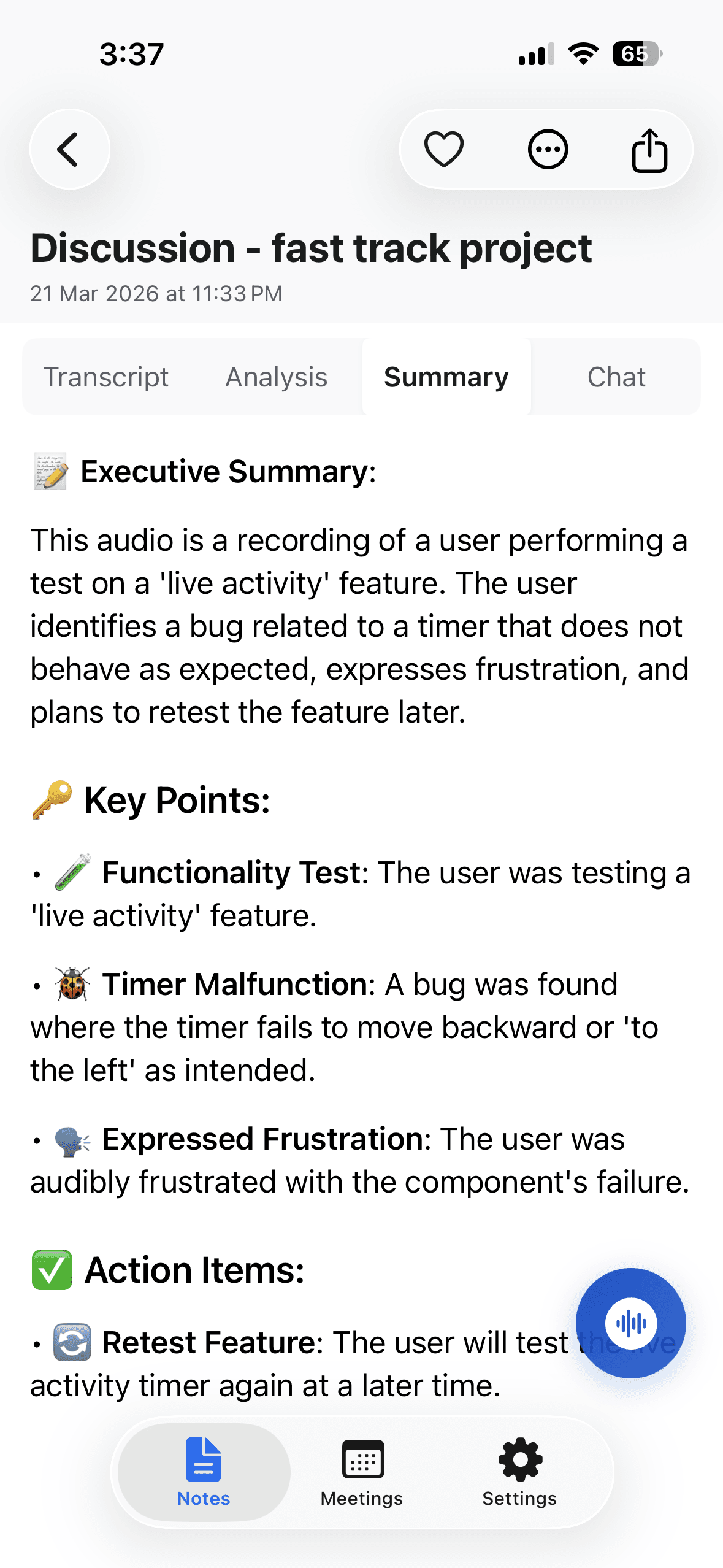
- 3Wait for processing. A 1-hour recording takes about 2 minutes. The note then holds a transcript with speaker labels and timestamps, a summary, a detailed analysis and action items with assignees.
- 4Choose the minutes of meeting output style to get the formal record.
- 5Run the same recording again with the key bullet points style to get the short version for the team.
- 6Read both, edit the summary where a name or a figure is wrong, and export to PDF or Word.
The other output styles
There are six output styles in total. The other four are email, to-do list, formal report, and a custom instruction where you describe the format in your own words. The custom instruction is useful when your organisation has its own minutes layout. The summaries feature page explains each style, and export and sharing covers the file formats.
Sample output: the same meeting as minutes
The card below is an invented example. It shows a 25-minute planning meeting written as minutes. The names, dates and decisions are made up.
Here is the same meeting again as key bullet points, the version you would send to the team chat. It holds the same decisions and tasks, without the record fields.
- Launch moves to 9 November. Testing needs one more week.
- The shorter launch email is approved. One price needs fixing.
- Support cover for launch week is still open. It waits for the staff rota.
- Omar: finish testing by 30 October.
- Lina: send the corrected email by 16 October.
- Sara: share the staff rota by 20 October.
Date and time: 13 October 2026, 10:00 to 10:25
Present: Sara (chair), Omar, Lina. Apologies: none
Minutes taken by: Lina
1. Launch date. Omar reported that testing needs one more week. Decision: the launch moves from 2 November to 9 November.
2. Launch email. Lina presented two drafts. Decision: the shorter draft was approved with one price correction.
3. Support cover. Sara asked for extra cover in launch week. No decision was made. The item returns after the staff rota is shared.
Action 1: Omar to finish testing by 30 October.
Action 2: Lina to send the corrected email draft by 16 October.
Action 3: Sara to share the staff rota by 20 October.
Next meeting: 20 October 2026, 10:00
The meeting closed at 10:25.
Status: draft, to be approved at the next meeting.
Recording consent, and what Noter AI cannot do here
If you record a meeting to write notes or minutes, tell everyone before you start. You are responsible for that, and the laws differ from country to country. The guide to meeting recording laws by country is a starting point. For a formal body, also agree how long the audio is kept once the minutes are approved.
Noter AI has limits for this job, and you should know them before you rely on it.
- It writes a draft. Approval still belongs to your group. The app cannot tell you whether your organisation's rules are met.
- It works from the audio. Someone who attended and never spoke is not in the recording. Check the attendance list, the names and the figures yourself.
- Speaker names need a check. The transcript has speaker labels, and you can rename speakers so the right person is shown.
- It runs on phones and tablets only. There is no web app and no desktop app. You read and export from the iPhone, iPad or Android app.
- It needs audio. It takes a live recording, a bot on a call, or an imported audio file. It does not import video files or PDFs.
Frequently asked questions
Are meeting minutes a legal document?
It depends on the organisation and the country. Some bodies must keep minutes under a law or under their own governing documents, and others keep them by choice. This article does not state any legal rule. Ask the person responsible for governance in your organisation, or a legal adviser.
Can I turn meeting notes into minutes?
Yes, if the notes hold the decisions and the tasks. Add the record fields: date, times, place, attendance and the agenda order. Rewrite the text in neutral past tense, then send it as a draft for the group to approve. It becomes minutes only after that approval.
Does a normal team meeting need minutes?
Usually no. A weekly team meeting needs a short list of decisions and tasks with owners and dates, and notes do that well. Write minutes for a team meeting only when your organisation or a client asks for a formal record.
Is a transcript the same as minutes?
No. A transcript holds every word in the order it was said. Minutes hold the outcome: who attended, what was decided and who does what. A transcript is useful as the source you check when people remember a decision differently.
How long should each document be?
Notes for a one-hour team meeting usually fit on one page. Minutes are longer because they carry attendance, every agenda item and the record fields. In both, the decision should be one clear sentence that a reader can find fast.
Can an AI app write meeting minutes?
An app can write the draft. Noter AI has a minutes of meeting output style that turns a recording into a structured draft, and a key bullet points style for the short version. A person still checks names, figures and attendance, and the group still approves the result.
Who gets the notes and who gets the minutes?
Notes go to the people who attended and to teammates who missed the meeting. Minutes go to every member of the body, including those who were absent. Your organisation's rules may also say who else can see them, so check before you share minutes outside the group.
Let Noter AI take your meeting notes
Record, transcribe, and summarize meetings on iPhone, iPad & Android, or send a bot to Zoom, Teams, Meet, or Webex. In 60+ languages.

On your computer? Scan with your phone to get the app.
