

Translate meeting transcripts into 46 languages
Noter AI translates a meeting transcript into 46 languages once the meeting has been recorded. The translated transcript keeps the speaker label and the timestamp on every line, so you can still see who said what and when. It works the same way for a meeting you recorded on your phone and for a video call the bot joined.
Updated October 2026
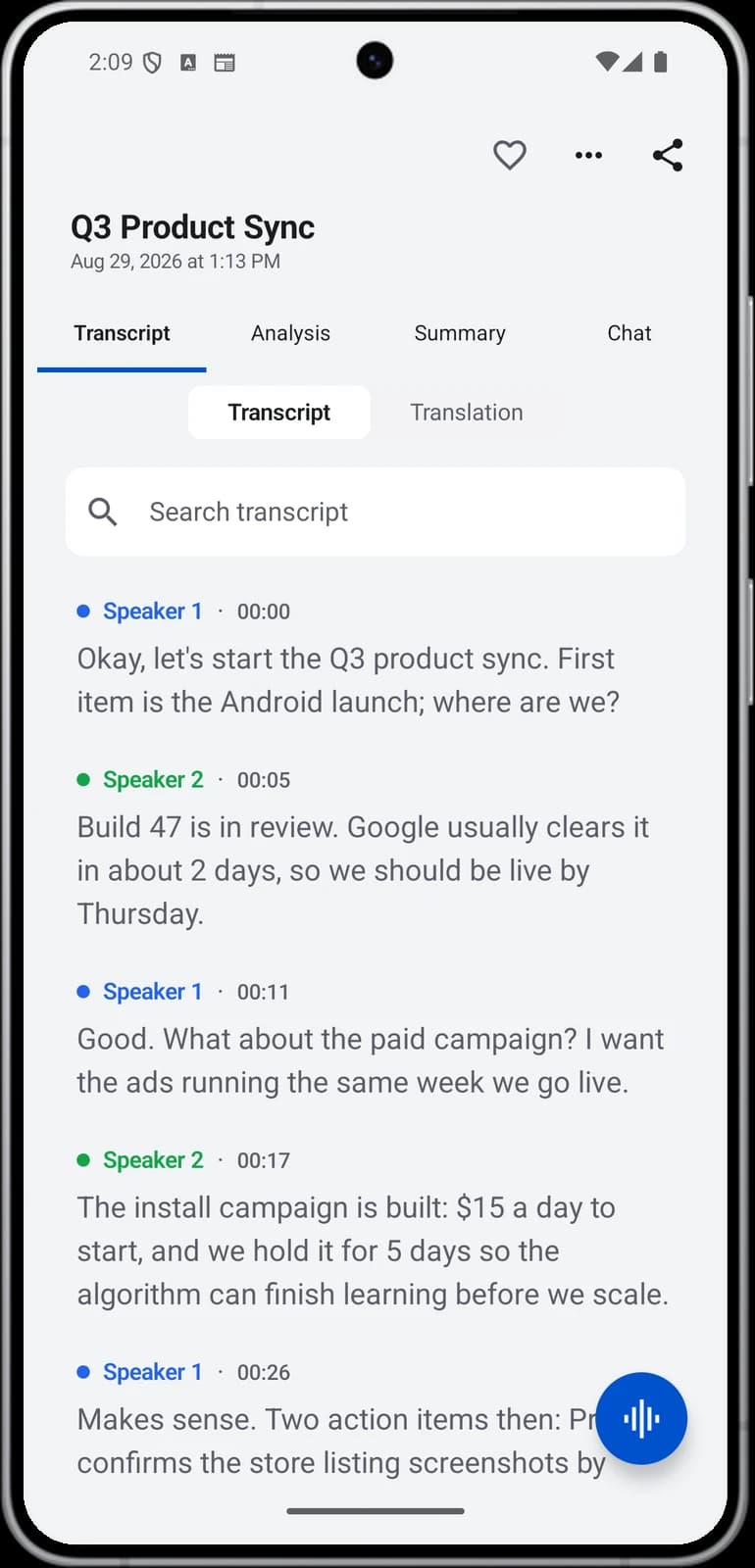
Spanish · same speakers, same times
How it works
- 1Capture the meeting. Record it in the room on your iPhone, iPad or Android phone, or send the bot to a Zoom, Microsoft Teams, Google Meet or Webex call.
- 2Let the note finish. A 1-hour recording takes about 2 minutes to process. The spoken language is detected automatically, so there is nothing to pick before you record.
- 3Open the transcript and choose a language. There are 46 languages to choose from.
- 4Read the translated transcript. Every line still shows its speaker and its timestamp, in the same order as the meeting.
Noter AI records, transcribes and summarizes your meetings on iPhone, iPad & Android, in 60+ languages.
What you get
- 46 target languages. They include Arabic, English, Spanish, French, German, Portuguese, Hindi, Japanese, Korean and Turkish. There are 46 in total.
- Speaker labels stay in place. You can still follow the conversation person by person.
- Timestamps stay in place. Each translated line carries the time it was said in the meeting.
- Any source language the app can transcribe. Transcription covers 60+ languages, including meetings where people switch language in the middle of a sentence.
- No extra fee. Translation is part of the one plan. There are no AI credits to buy.
Sample output
This is an invented example. It shows four lines from a short Q4 launch meeting held in Spanish, and the same lines after translation into English.
| Time | Speaker | Original (Spanish) | Translated (English) |
|---|---|---|---|
| 00:42 | Sara | Tenemos que cerrar hoy la fecha del lanzamiento del cuarto trimestre. | We need to settle the Q4 launch date today. |
| 01:05 | Omar | El equipo de diseño necesita dos semanas más para la página. | The design team needs two more weeks for the page. |
| 01:20 | Sara | Entonces lanzamos el 18 de noviembre. ¿Quién avisa a ventas? | Then we launch on 18 November. Who tells sales? |
| 01:34 | Omar | Yo les escribo mañana por la mañana. | I will write to them tomorrow morning. |
Translating the transcript versus getting the summary in another language
These are two separate things, and most people need only one of them. The summary can be written in the meeting's language or in a language you choose. The transcript translation gives you every line of the meeting in the new language.
| Translated transcript | Summary in another language | |
|---|---|---|
| What it is | Every line of the meeting, in the new language | The summary of the meeting, in the language you choose |
| Length | As long as the meeting | Short enough to read in a few minutes |
| What it keeps | Speaker labels and a timestamp on every line | The main points and the action items |
| Best for | Checking exact wording, or quoting what one person said | Telling someone who was not there what was decided |
| Who reads it | A colleague who needs the detail | A manager, a client or head office |
- Start with the summary. If the reader only needs the decisions and the tasks, a summary in their language is enough.
- Translate the transcript when the words matter. Use it for a price that was quoted, a promise that was made, or a point people disagree about later.
- You can do both on the same note. One recording can give you a summary in one language and a translated transcript in another.
Use case: the team meets in one language and reports in another
A regional team holds its weekly meeting in Arabic. Product names and numbers are said in English, as they often are. Head office reads English only.
The team lead records the meeting on a phone in the middle of the table. Nobody chooses a language first, and the mixed sentences are transcribed as they were spoken. After the meeting, the lead sets the summary language to English and sends the summary and action items to head office the same day.
Two days later, head office asks what exactly was agreed about a delivery date. The lead translates the transcript into English, finds the line by its timestamp, and sends that part. The speaker label shows who made the commitment. Nobody had to retype or translate the meeting by hand.
The same approach works in the other direction. A call held in English can be summarised in Arabic for a local team. Arabic output is written in formal Modern Standard Arabic.
Limits and honest notes
- It works after the meeting. Translation runs on a finished transcript. It does not translate live while people are talking.
- It is text only. You get a translated transcript to read. You do not get translated audio.
- 46 is fewer than 60+. The app transcribes more languages than it translates into. Check that the language you need is one of the 46 targets.
- It is machine translation. Names, product terms and jokes can come out wrong. Ask a speaker of the language to check anything that goes into a contract or a legal file.
- It depends on the audio. If the recording is hard to hear, the transcript has mistakes, and the translation repeats them.
- Arabic is formal. Arabic output is Modern Standard Arabic. It does not come out in a local dialect.
Getting a better translation
A translation is only as good as the transcript under it. A few small habits help.
- Record close to the speakers. In a room, put the phone in the middle of the table. See recording in-person meetings for placement tips.
- Rename the speakers before you share. A line from Sara is easier to follow than a line from an unnamed speaker.
- Tap the line to hear it. If a translated line looks odd, play the audio from that moment and check what was really said.
- Read the guide for the full walkthrough. How to translate meeting notes covers the steps in more detail.
Frequently asked questions
How many languages can Noter AI translate a transcript into?
46 languages. Arabic, English, Spanish, French, German, Portuguese, Hindi, Japanese, Korean and Turkish are among them.
Does the translated transcript keep speaker names and timestamps?
Yes. Each translated line keeps its speaker label and its timestamp, so the translation reads in the same order as the meeting.
Can I get the summary in another language without translating the whole transcript?
Yes. The summary comes in the meeting's language, or in a language you choose. That is separate from translating the transcript, and for most reports it is all you need.
Does it translate live during the meeting?
No. The meeting is recorded first, the transcript is made, and then you translate it. For a 1-hour recording the note is ready in about 2 minutes.
What if the meeting itself was in two languages?
Transcription handles speakers who switch language, even inside one sentence. You can then translate the whole transcript into a single language so one reader can follow all of it.
Does translation cost extra?
No. There is one plan with everything in it, at $11.99 per month or $89.99 per year in the US. There are no AI credits. See pricing for details.
Is my transcript used to train AI when I translate it?
No. Your notes and audio are not used to train AI models. They are encrypted in transit and at rest, and you can delete a note or your whole account at any time.
Let Noter AI take your meeting notes
Record, transcribe, and summarize meetings on iPhone, iPad & Android, or send a bot to Zoom, Teams, Meet, or Webex. In 60+ languages.

On your computer? Scan with your phone to get the app.
