

Noter AI for ChatGPT: ask ChatGPT about your meeting notes
Noter AI records your meetings and writes the notes. Connect it to ChatGPT once, and ChatGPT can search and read those notes when you ask. Ask what was decided last week, what a client asked for, or what came up across ten calls. ChatGPT only reads. It never hears your audio, and it cannot change or delete a note.
By Yousef Updated
Takes a minute on a computer.
- Step 1:Add Noter AIIn ChatGPT on a computer, open Noter AI in Plugins and click Install plugin.
- Step 2:Sign inChatGPT opens a Noter AI page. Sign in with your Noter AI account.
- Step 3:Click AllowCheck that the page names ChatGPT, then click Allow.
- Step 4:Ask about your notesIn a chat, type @, pick Noter AI and ask about a meeting.
What you can ask ChatGPT
Ask in your own words. ChatGPT finds the notes, reads them and answers with the name and date of each note it used, and a link to open it in Noter AI. It works for one meeting or for many at once.
| Your work | Ask ChatGPT |
|---|---|
| Sales calls | What did the client ask for in Monday's call, and what did I promise? |
| Team meetings | List every open action item from this week's meetings, with the owner. |
| Lectures | Make 10 quiz questions from my last three biology lectures. |
| Interviews | Which people I interviewed talked about remote work, and what did they say? |
| Arabic meetings | ما القرارات التي اتخذناها في اجتماع الميزانية؟ |
| Many notes at once | How did the client's priorities change from September to November? |
Noter AI records, transcribes and summarizes your meetings on iPhone, iPad & Android, in 60+ languages.
A note taker that ChatGPT can read
Many people search for a ChatGPT note taker. ChatGPT can write notes from text you give it, and on a Mac some paid plans can record a meeting in the ChatGPT desktop app. It does not record a meeting from your phone, and it does not send a bot to Zoom, Teams, Google Meet or Webex.
Noter AI does that part. It records the room from your iPhone, iPad or Android phone, or sends a bot to your video call. Each recording becomes a note with a summary, an analysis and a full transcript. Once Noter AI is connected, ChatGPT can read all of those notes, so you can ask about any meeting from the same chat where you write and plan. For more on what ChatGPT can do with audio by itself, see Can ChatGPT transcribe audio?
How it works
When your question is about your notes, ChatGPT asks Noter AI. It can do three things, and nothing else.
- Search your notes by words in the title, summary and analysis.
- List your recent notes, newest first, or the notes from a date range, for questions like "my last meeting" or "notes from this week".
- Open one note and read its summary, analysis and transcript. Long transcripts come in parts, and ChatGPT can ask for the next part.
Search understands Arabic the way people write it: with or without vowel marks, with different spellings of the same letter, and with ال or plural endings on a word. So an Arabic question finds Arabic notes.
How to connect Noter AI to ChatGPT
You connect once, on a computer. Full steps, with a short demo on real screens, are in How to connect your meeting notes to ChatGPT.
- 1Open ChatGPT on a computer. Go to Noter AI in ChatGPT, or open Plugins in ChatGPT and search for Noter AI. Some accounts show Apps in place of Plugins.
- 2Click Install plugin. ChatGPT opens a Noter AI page.
- 3Sign in and click Allow. Use your Noter AI account: Apple, Google or email, the same one you use in the app. Check that the page names ChatGPT first.
- 4Ask about your notes. In a chat, type @ and pick Noter AI, or pick it from the + menu. Then ask about a meeting.
What ChatGPT can read, and what it cannot
| ChatGPT can | ChatGPT cannot |
|---|---|
| Read the summary, analysis and transcript of a note | Hear your audio |
| See the title, date, length, language and speaker names | Edit, rename or delete a note |
| Search across all your notes | Start or stop a recording |
| Give you a link to each note it used | Read the notes of another account |
Premium and your plan
Reading your notes from ChatGPT is part of Noter AI Premium. If your account does not have Premium, ChatGPT tells you that the account does not include this access. See pricing.
Your ChatGPT plan is separate. In our test on 16 November 2026, a free ChatGPT account could install Noter AI and ask about notes. OpenAI says which apps you can use depends on your ChatGPT plan, your country and, at work, your workspace settings.
Your ChatGPT data setting
Meeting notes are private, so you should know this before you connect. On ChatGPT Free, Go, Plus and Pro, OpenAI may use what ChatGPT reads from your notes to train its models when the setting "Improve the model for everyone" is on. To turn it off, open ChatGPT, then Settings, then Data controls. OpenAI says Business, Enterprise and Edu workspaces are not used for training by default.
Noter AI itself does not train AI models on your recordings or notes. Details are in our privacy policy.
Privacy and how to disconnect
Noter AI sends ChatGPT only the notes it asks for, and only when you ask a question. Your audio is never sent. What ChatGPT keeps after that follows your own ChatGPT settings. More on the security page.
To disconnect, sign in to the web app, open Account, then Connected apps, and click Disconnect next to ChatGPT. Deleting your Noter AI account ends the connection too.
A real answer
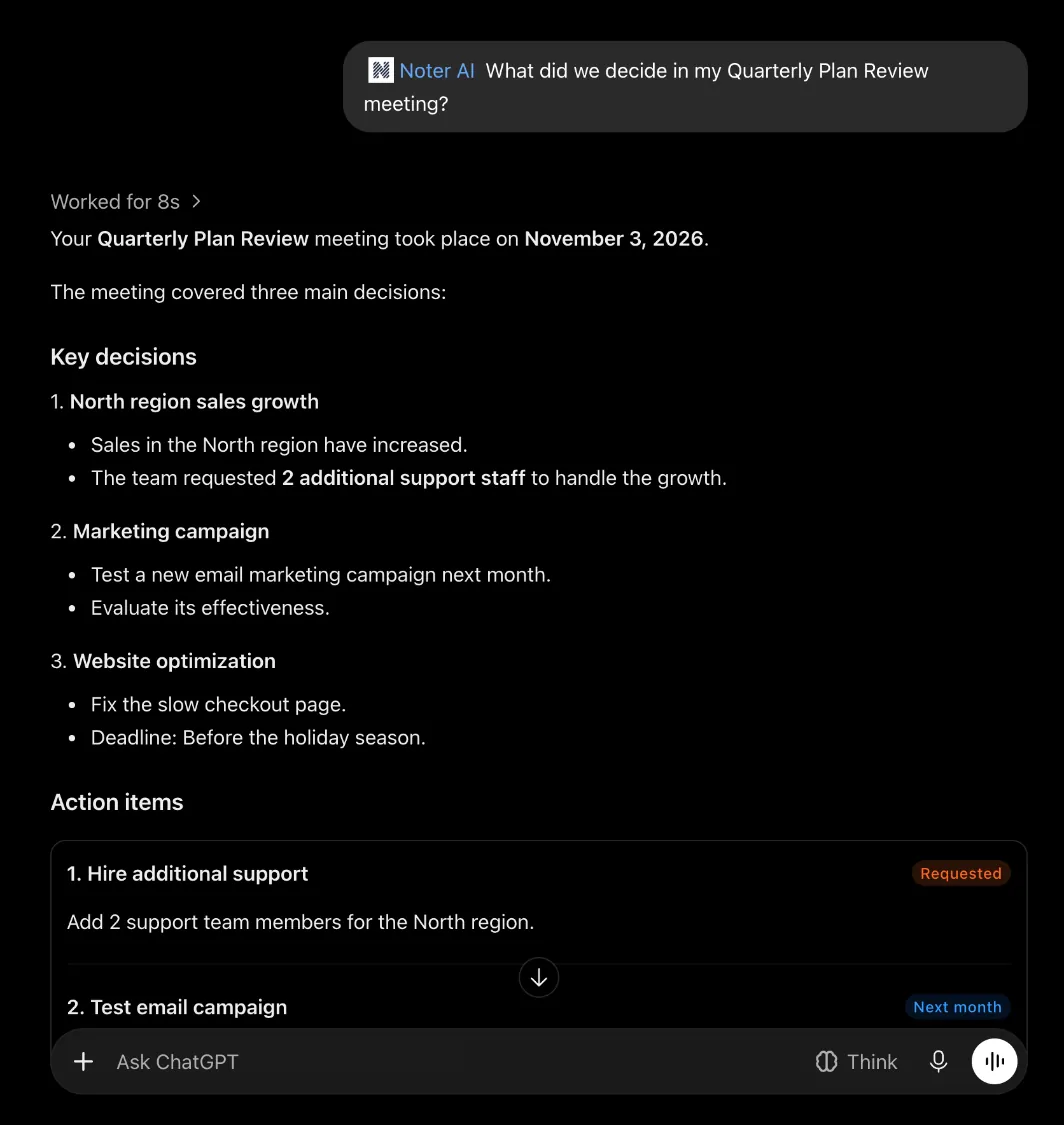
We recorded a short demo meeting called "Quarterly Plan Review" and asked ChatGPT about it. This is part of ChatGPT's answer.
ChatGPT: Your Quarterly Plan Review meeting took place on November 3, 2026.
North region sales grew. The team asked for 2 more support staff.
Test a new email marketing campaign next month.
Fix the slow checkout page before the holiday season.
Source: Quarterly Plan Review, November 3, 2026. Open the original meeting in Noter AI.
Limits and honest notes
- Notes keep the language that was spoken. If ChatGPT finds nothing, ask again with words in that language.
- A recording still processing cannot be read yet. ChatGPT will say so. Try again a few minutes later.
- Guest accounts cannot connect. If you use the phone app as a guest, sign in inside the app first. Your notes move with you.
- ChatGPT can make mistakes. Each answer names the note it used and links to it, so you can check the source.
- ChatGPT is a product of OpenAI. Noter AI is a separate app, not made or endorsed by OpenAI.
Frequently asked questions
Do I need Noter AI Premium?
Yes. Reading your notes from ChatGPT is part of Noter AI Premium. Recording and the notes themselves work as before on every plan.
Can ChatGPT take meeting notes by itself?
Partly. ChatGPT can write notes from a transcript you give it, and some paid plans can record a meeting in the ChatGPT app on a Mac. It does not record from your phone or join a video call. Noter AI records the meeting, and ChatGPT reads the notes once you connect them.
Does ChatGPT hear my recordings?
No. ChatGPT reads the text of a note: the summary, the analysis and the transcript. Your audio stays in Noter AI.
Will OpenAI train on my meeting notes?
It can, on ChatGPT Free, Go, Plus and Pro, when "Improve the model for everyone" is on. Turn it off in ChatGPT under Settings, then Data controls. Business, Enterprise and Edu workspaces are not used for training by default, according to OpenAI.
Can ChatGPT change or delete my notes?
No. The connection is read only. Changes to notes, recording and deleting happen only in the Noter AI app.
Does it work with Arabic notes?
Yes. Search handles Arabic spellings and word forms. Ask in Arabic to find notes from Arabic meetings.
How do I disconnect?
In the Noter AI web app, open Account, then Connected apps, and click Disconnect next to ChatGPT. After that, ChatGPT cannot read your notes.
Let Noter AI take your meeting notes
Record, transcribe, and summarize meetings on iPhone, iPad & Android, or send a bot to Zoom, Teams, Meet, or Webex. In 60+ languages.

